
Customize Your New Tab Page with Perfect Efficiency
Overview
Perfect New Tab Page is a productivity-focused desktop utility designed to streamline web navigation by transforming the default new tab experience into a personalized, efficient workspace. It enables users to quickly access frequently visited websites and applications through a customizable dashboard, reducing time spent searching for links. The software targets both casual internet users and professionals who rely on consistent access to essential tools such as email, search engines, and content platforms.
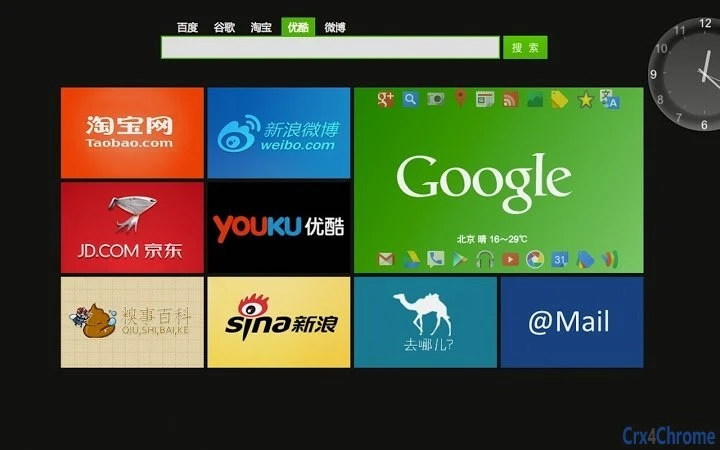
It provides a default layout tailored for Chinese-speaking users, integrating popular domestic services like Baidu, Weibo, Youku, Taobao, Sina, and 163 Mail. These integrations are optimized for fast access, with built-in search boxes for major platforms that support search suggestions. This setup helps users reach their desired destinations faster, minimizing navigation overhead. The tool also supports screen capture, background customization, and one-click addition of commonly used websites, enhancing both functionality and personalization.
While the developer’s background is not specified, the software’s focus on usability and localization suggests a targeted approach to user experience. It is particularly useful for users who open multiple tabs daily and want a centralized hub for their digital workflow. The tool operates as a browser extension or integrated desktop application, depending on the platform, offering seamless access from within supported environments.
Key Features & Capabilities
- Customizable Dashboard – Rearrange websites and applications by dragging and dropping elements to create a personalized layout that fits your workflow.
- One-Click Website Addition – Quickly add frequently visited sites with a single click, eliminating the need for manual bookmarking or URL entry.
- Integrated Search Boxes – Access built-in search fields for Baidu, Google, Taobao, Youku, and Weibo, complete with auto-suggestions to speed up navigation.
- Screen Capture Tool – Capture screenshots directly from the new tab interface, useful for saving content or sharing visual references.
- Background Customization – Personalize the appearance of the new tab page with custom images or solid colors to match your preferences.
- Bookmark Bar Visibility – Toggle the display of the bookmark bar for quick access to saved links.
- Recent Tabs Recovery – View and reopen recently closed tabs, helping users recover lost browsing sessions.
- Application Management – Organize and manage integrated applications within the new tab interface for better workflow control.
These features collectively reduce the time spent on repetitive tasks and create a more intuitive browsing environment. For example, a student can set up a dashboard with their university portal, Google Scholar, and a note-taking app, while a content creator might prioritize YouTube, Taobao, and a design tool. The flexibility allows users to adapt the interface to their specific routines, improving daily productivity.
User Interface, Workflow & Performance
The user interface of Perfect New Tab Page is clean and minimal, designed to prioritize usability over visual complexity. Navigation is intuitive, relying on drag-and-drop mechanics for reordering elements and simple toggle switches for enabling or disabling features. The layout is responsive and adjusts smoothly to different screen sizes, ensuring consistent performance across devices.
Workflow efficiency is enhanced by the immediate availability of key tools—such as search, bookmarks, and recent tabs—directly on the new tab screen. This eliminates the need to navigate through menus or open separate panels. The software integrates seamlessly with the browser environment, launching instantly when a new tab is opened.
Performance details were not specified by the developer. However, based on the application’s size (15.3 MB) and typical behavior of similar utilities, it is expected to have low resource consumption. The developer did not provide additional system requirements or performance benchmarks. Stability is assumed to be consistent with standard browser-based extensions, though real-world testing may vary depending on the user’s environment.
Compatibility & System Requirements
Perfect New Tab Page is available for both Windows and Mac operating systems, making it accessible to a broad range of users. The software version is 1.0.2, with a file size of 15.3 MB, indicating a lightweight installation. It is designed to work as a desktop application or browser extension, depending on the platform and user configuration.
Exact system requirements were not listed. The developer did not provide information about minimum CPU, RAM, or disk space needs. Compatibility with specific browser versions or macOS/Windows releases is also not specified. Users should ensure their system meets general requirements for running modern desktop applications and web browsers.
Pros and Cons
Pros
- Highly customizable interface with drag-and-drop layout control
- Default layout optimized for Chinese users with popular domestic sites
- One-click addition of frequently used websites
- Integrated search with auto-suggestions for major platforms
- Supports screen capture and background personalization
- Free to download and use
- Lightweight at 15.3 MB
Cons
- Developer background not disclosed
- No official system requirements provided
- Performance data not specified
- Compatibility with specific browser versions is unclear
- Only available for Windows and Mac (no cross-platform support for other OS)
FAQ Section
Is Perfect New Tab Page compatible with all browsers?
Compatibility information is limited. The software is confirmed to work on Windows and Mac, but specific browser support was not detailed by the developer.
Is the software safe to install and use?
Perfect New Tab Page is free and designed for desktop use. No security vulnerabilities were reported. Users should download from official sources to ensure integrity.
How often does the software receive updates?
The current version is 1.0.2, released on May 20, 2024. The update frequency is not specified, but regular updates are common for productivity tools to maintain compatibility and fix issues.
Does it require an internet connection to function?
The software operates primarily online, as it integrates with web services and search engines. However, core features like layout customization and screen capture can function offline after initial setup.
Can I use this tool without a paid license?
Yes. Perfect New Tab Page is available for free. No subscription or payment is required to access its full feature set.
Final Thoughts + CTA
Perfect New Tab Page delivers a focused, efficient solution for users seeking to optimize their browsing experience. Its customizable dashboard, built-in search tools, and support for essential Chinese websites make it a strong choice for users who value speed and personalization. The clean interface and lightweight design contribute to a smooth user experience, while the free pricing model increases accessibility.
While some technical details such as system requirements and performance metrics are not provided, the software’s core functionality is well-executed and practical. It is particularly beneficial for professionals, students, and everyday users who open multiple tabs daily and want a smarter, more organized start to their browsing sessions.
With its intuitive design and strong feature set, Perfect New Tab Page stands out as a reliable tool for enhancing productivity. Download Perfect New Tab Page now.







